// Real product vocabulary, used everywhere on the landing.

const CHIP_CATEGORIES = [
  { label: 'SHOT SIZE', items: ['ECU (Extreme Close-Up)', 'CU (Close-Up)', 'MCU (Medium Close-Up)', 'MS (Medium Shot)', 'MLS (Medium Long Shot)', 'FS (Full Shot)', 'WS (Wide Shot)', 'EWS (Extreme Wide Shot)', 'OTS (Over-the-Shoulder)', 'POV', 'Insert Shot', 'Two-Shot', 'Cowboy Shot'] },
  { label: 'CAMERA ANGLE', items: ['Eye Level', 'Low Angle', 'High Angle', 'Dutch Angle', "Worm's Eye", "Bird's Eye", 'Overhead', 'POV', 'Canted', 'Reverse Angle'] },
  { label: 'LENS', items: ['14mm Ultra Wide', '24mm Wide', '35mm Standard', '50mm Normal', '85mm Portrait', '100mm Macro', '135mm Telephoto', '200mm Telephoto', 'Anamorphic', 'Tilt-Shift', 'Fisheye'] },
  { label: 'LIGHTING', items: ['Three-Point', 'Rembrandt', 'Split', 'Loop', 'Butterfly', 'Practical', 'Motivated', 'High Key', 'Low Key', 'Golden Hour', 'Blue Hour', 'Hard Key', 'Soft Box', 'Backlight'] },
  { label: 'ASPECT RATIO', items: ['2.39:1 (Anamorphic)', '1.85:1 (Flat Widescreen)', '16:9 (HD)', '4:3 (Academy)', '1.66:1 (European)', '2:1 (Univisium)', '21:9 (Ultra Widescreen)', '1:1 (Square)'] },
  { label: 'MOOD', items: ['Cinematic', 'Melancholic', 'Tense', 'Dreamlike', 'Nostalgic', 'Foreboding', 'Intimate', 'Epic', 'Serene', 'Frenetic'] },
  { label: 'STYLE', items: ['Denis Villeneuve', 'Ridley Scott', 'Christopher Nolan', 'Fritz Lang', 'Tarkovsky', 'Roger Deakins', 'IMAX', 'Neo-noir', 'Brutalist sci-fi', 'Anime Cel'] },
];

// Categories from the actual "What are you making?" screen.
const PRODUCT_CATEGORIES = [
  {
    group: 'Pre-production',
    items: [
      { name: 'Mood Board', desc: 'Visual tone & atmosphere reference', presets: 2, glyph: '◐' },
      { name: 'Style Frame', desc: 'Key moment visual — look & feel', presets: 2, glyph: '◧' },
      { name: 'Color Script', desc: 'Color progression across scenes', presets: 1, glyph: '⌗' },
      { name: 'Storyboard', desc: 'Sequential shot-by-shot breakdown', presets: 1, glyph: '⊟' },
    ],
  },
  {
    group: 'Character',
    items: [
      { name: 'Character Design', desc: 'Full character concept sheet', presets: 1, glyph: '◉' },
      { name: 'Turnaround', desc: 'Multi-angle consistency sheet', presets: 1, glyph: '⟳', llm: true },
      { name: 'Expression Sheet', desc: 'Emotional range reference', presets: 1, glyph: '◔' },
    ],
  },
  {
    group: 'Environment',
    items: [
      { name: 'Scene Concept', desc: 'Environment concept art', presets: 1, glyph: '△', llm: true },
      { name: 'Panorama / Establishing', desc: 'Wide establishing shot', presets: 1, glyph: '▭', llm: true },
      { name: 'Lighting Study', desc: 'Lighting variation reference', presets: 1, glyph: '◇' },
    ],
  },
  {
    group: 'Storyboard & Sequence',
    items: [
      { name: 'Shot Sequence', desc: 'Multi-shot narrative sequence', presets: 1, glyph: '⫼' },
      { name: 'Comic / Manga Page', desc: 'Panel-based visual storytelling', presets: 0, glyph: '▦' },
    ],
  },
  {
    group: 'Production & VFX',
    items: [
      { name: 'Prop / Costume', desc: 'Detailed prop or costume reference', presets: 1, glyph: '⊕' },
      { name: 'VFX Reference', desc: 'Visual effects breakdown', presets: 1, glyph: '✺' },
      { name: 'Film Poster / Key Art', desc: 'Marketing key visual', presets: 1, glyph: '▢', llm: true },
    ],
  },
];

const MODELS = [
  {
    name: 'Midjourney',
    tag: 'v6.1',
    desc: 'Photorealistic, cinematic. Parameters for aspect ratio, stylization, style raw.',
    snippet: `/imagine prompt: monumental brutalist steampunk cityscape,
a man standing alone on a windswept hill, seen from behind,
towering concrete megastructures fused with brass pipes,
smokestacks, cables, gears, industrial haze, epic wide shot,
35mm anamorphic, teal-and-amber color grade, desaturated
concrete, copper highlights, volumetric smoke, film grain`,
    lang: 'mj',
  },
  {
    name: 'Flux 2 Max',
    tag: 'natural',
    desc: 'Detailed natural-language descriptions with explicit camera and lens specs.',
    snippet: `Cinematic film still, a current-day man in modern clothing standing alone on a windswept hill, looking out over a vast brutalist steampunk city. Colossal concrete megastructures fused with brass pipes, smokestacks, elevated rail lines, steam vents, turbine towers, and industrial spires. Shot on ARRI Alexa 65, 40mm anamorphic lens, f/2.8. [model: flux-realism, guidance_scale: 20, steps: 50]`,
    lang: 'prose',
  },
  {
    name: 'Nano Banana',
    tag: 'Gemini',
    desc: 'Conversational. Think describing a scene to a cinematographer over coffee.',
    snippet: `Create a cinematic sci-fi still: a modern man stands alone on a windy hill, seen from behind, looking across an enormous brutalist steampunk city. Make him feel small against concrete megastructures, brass pipes, smoke, steam, and blue-hour industrial lights. Keep it moody, monumental, teal-and-amber, like a serious high-budget film frame.`,
    lang: 'chat',
  },
  {
    name: 'GPT Image 2',
    tag: 'JSON',
    desc: 'Structured output for multi-panel layouts and controlled compositions.',
    snippet: `{
  "goal": "Create a cinematic still from a high-budget science-fiction film.",
  "subject": "A present-day man in contemporary clothing stands alone on a windswept hill.",
  "scene": "Twilight over a colossal brutalist steampunk metropolis.",
  "style": "cinematic, brutalist architecture, steampunk industrial design, teal-and-amber color grading, film grain",
  "layout": { "grid": "3x3", "continuity": "Same character across all panels" },
  "constraints": { "must_avoid": "watermark, text, logo, cheap CGI, distorted perspective" }
}`,
    lang: 'json',
  },
];

// Tokens used in the "anatomy" diagram, ordered as the prompt reads.
const ANATOMY_TOKENS = [
  { k: 'Subject',  v: 'present-day man, seen from behind' },
  { k: 'Wardrobe', v: 'modern clothing, grounded human silhouette' },
  { k: 'Setting',  v: 'brutalist steampunk metropolis, windswept hill' },
  { k: 'Shot',     v: 'epic wide establishing shot' },
  { k: 'Lens',     v: '35mm / 40mm anamorphic' },
  { k: 'Lighting', v: 'dusk, cold blue ambience, amber industrial glow' },
  { k: 'Mood',     v: 'awe-struck, foreboding, melancholic' },
  { k: 'Style',    v: 'Villeneuve scale, Ridley Scott industrial worldbuilding' },
  { k: 'Params',   v: 'flux-realism, guidance 20, steps 50' },
];

Object.assign(window, { CHIP_CATEGORIES, PRODUCT_CATEGORIES, MODELS, ANATOMY_TOKENS });


// ─────────────────────────────────────────────────────────

// Hero — left text, right cascading chip grid + floating prompt card.

const ROLES = ['creators', 'designers', 'visual storytellers', 'anyone, really', 'makers'];

function HeroNav({ accent }) {
  return (
    <nav style={{
      position: 'absolute', top: 0, left: 0, right: 0, zIndex: 5,
      display: 'flex', alignItems: 'center', justifyContent: 'space-between',
      padding: '22px 32px', fontSize: 13, color: 'var(--text-2)',
    }}>
      <div style={{ display: 'flex', alignItems: 'center', gap: 10 }}>
        <span style={{
          width: 22, height: 22, borderRadius: 6, display: 'inline-grid', placeItems: 'center',
          background: accent, color: '#fff', fontFamily: 'var(--mono)', fontSize: 12, fontWeight: 500,
        }}>P</span>
        <span style={{ fontWeight: 500, letterSpacing: '-0.01em' }}>Prompt Builder</span>
        <span style={{ color: 'var(--dim)', fontSize: 12, marginLeft: 4 }}>Film & AI Image</span>
      </div>
      <div style={{ display: 'flex', alignItems: 'center', gap: 24, fontSize: 13 }}>
        <a href="#categories" style={{ color: 'var(--muted)' }}>Categories</a>
        <a href="#anatomy" style={{ color: 'var(--muted)' }}>How it works</a>
        <a href="#models" style={{ color: 'var(--muted)' }}>Models</a>
        <a href="prompt-builder.html" style={{
          padding: '7px 14px', borderRadius: 8, border: `1px solid ${accent}`, color: accent, fontWeight: 500,
        }}>Open the tool →</a>
      </div>
    </nav>
  );
}

function RoleSwap({ rotate, accent }) {
  const [i, setI] = React.useState(0);
  React.useEffect(() => {
    if (!rotate) return;
    const id = setInterval(() => setI((x) => (x + 1) % ROLES.length), 2400);
    return () => clearInterval(id);
  }, [rotate]);
  return (
    <span style={{
      position: 'relative', display: 'inline-block', color: accent, fontWeight: 500,
      verticalAlign: 'baseline',
    }}>
      <span style={{ visibility: 'hidden', whiteSpace: 'nowrap' }}>visual storytellers</span>
      {ROLES.map((r, idx) => (
        <span key={r} style={{
          position: 'absolute', left: 0, top: 0,
          opacity: idx === i ? 1 : 0,
          transform: idx === i ? 'translateY(0)' : 'translateY(8px)',
          transition: 'opacity .5s ease, transform .5s ease',
          whiteSpace: 'nowrap',
        }}>{r}</span>
      ))}
    </span>
  );
}

// A single chip — supports selected, ghost, and "preview" pulse states.
function Chip({ label, selected, dim, glow }) {
  const base = {
    fontFamily: 'var(--sans)', fontSize: 13, fontWeight: 400,
    padding: '7px 14px', borderRadius: 999, whiteSpace: 'nowrap',
    border: '1px solid', transition: 'all .3s ease',
  };
  if (selected) {
    return <span style={{
      ...base,
      background: 'var(--accent)', color: '#fff',
      borderColor: 'var(--accent)',
      boxShadow: glow ? '0 0 0 4px rgba(138,106,170,0.16), 0 4px 14px rgba(138,106,170,0.28)' : '0 2px 8px rgba(138,106,170,0.22)',
    }}>{label}</span>;
  }
  return <span style={{
    ...base,
    background: 'rgba(255,255,255,0.55)',
    color: dim ? 'var(--dim)' : 'var(--text-2)',
    borderColor: 'var(--border)',
    opacity: dim ? 0.55 : 1,
  }}>{label}</span>;
}

// Cascading chip wall — mirrors the product's chip grid, with masks and parallax drift.
function ChipCascade({ selections }) {
  // selections: { [catLabel]: Set<itemName> }
  const ref = React.useRef(null);
  // Subtle vertical drift
  const [t, setT] = React.useState(0);
  React.useEffect(() => {
    let raf;
    const start = performance.now();
    const loop = () => {
      setT((performance.now() - start) / 1000);
      raf = requestAnimationFrame(loop);
    };
    raf = requestAnimationFrame(loop);
    return () => cancelAnimationFrame(raf);
  }, []);
  return (
    <div ref={ref} style={{
      position: 'relative', width: '100%', height: '100%', overflow: 'hidden',
      maskImage: 'linear-gradient(to bottom, transparent 0%, #000 12%, #000 78%, transparent 100%)',
      WebkitMaskImage: 'linear-gradient(to bottom, transparent 0%, #000 12%, #000 78%, transparent 100%)',
    }}>
      <div style={{
        position: 'absolute', left: 0, right: 0, top: 0,
        transform: `translateY(${-Math.sin(t * 0.15) * 8 - 20}px)`,
        padding: '24px 0',
        display: 'flex', flexDirection: 'column', gap: 18,
      }}>
        {CHIP_CATEGORIES.map((cat, ci) => {
          const sel = selections[cat.label] || new Set();
          // Repeat items twice so the wall feels infinite at the edges
          const items = [...cat.items, ...cat.items.slice(0, 4)];
          return (
            <div key={cat.label} style={{
              display: 'flex', flexDirection: 'column', gap: 8,
              transform: `translateX(${Math.sin(t * 0.12 + ci) * 6}px)`,
            }}>
              <div style={{
                fontFamily: 'var(--mono)', fontSize: 10, letterSpacing: '0.14em',
                color: 'var(--dim)', paddingLeft: 4,
              }}>{cat.label}</div>
              <div style={{ display: 'flex', flexWrap: 'wrap', gap: 8 }}>
                {items.map((it, idx) => (
                  <Chip key={cat.label + idx} label={it}
                    selected={sel.has(it)} glow={sel.has(it)}
                    dim={!sel.has(it) && idx > 6} />
                ))}
              </div>
            </div>
          );
        })}
      </div>
    </div>
  );
}

// Floating prompt-preview card that "assembles" tokens.
function PromptPreviewCard({ accent }) {
  const tokens = [
    { txt: '/imagine', mono: true, dim: true },
    { txt: 'prompt:', mono: true, dim: true },
    { txt: 'monumental brutalist steampunk cityscape' },
    { txt: 'modern man alone on a windswept hill' },
    { txt: 'epic wide shot', highlight: true },
    { txt: '35mm anamorphic', highlight: true },
    { txt: 'teal-and-amber industrial haze', highlight: true },
    { txt: 'awe-struck and foreboding', highlight: true },
    { txt: 'Villeneuve grandeur, Ridley Scott worldbuilding' },
    { txt: 'volumetric smoke, film grain', mono: true },
  ];
  return (
    <div style={{
      position: 'absolute', left: '-40px', bottom: '36px', zIndex: 2,
      width: 'min(460px, 86%)',
      background: 'rgba(255,255,255,0.78)',
      backdropFilter: 'blur(18px) saturate(140%)',
      WebkitBackdropFilter: 'blur(18px) saturate(140%)',
      border: '1px solid var(--border-2)',
      borderRadius: 14,
      boxShadow: '0 24px 60px -20px rgba(74,52,108,0.25), 0 4px 12px rgba(74,52,108,0.08)',
      padding: '14px 16px 16px',
    }}>
      <div style={{
        display: 'flex', alignItems: 'center', justifyContent: 'space-between',
        marginBottom: 10, fontFamily: 'var(--mono)', fontSize: 10,
        letterSpacing: '0.12em', color: 'var(--muted)', textTransform: 'uppercase',
      }}>
        <span>Prompt Preview · Midjourney</span>
        <span style={{
          display: 'inline-flex', alignItems: 'center', gap: 5,
          color: 'var(--accent-2)',
        }}>
          <span style={{
            width: 6, height: 6, borderRadius: '50%', background: 'var(--accent-2)',
            animation: 'pp-pulse 1.6s ease-in-out infinite',
          }}/>
          Assembling
        </span>
      </div>
      <div style={{
        display: 'flex', flexWrap: 'wrap', gap: '6px 7px', alignItems: 'center',
        fontSize: 13.5, lineHeight: 1.55, color: 'var(--text-2)',
      }}>
        {tokens.map((tk, i) => (
          <span key={i} style={{
            fontFamily: tk.mono ? 'var(--mono)' : 'var(--sans)',
            color: tk.dim ? 'var(--muted)' : tk.highlight ? accent : 'var(--text-2)',
            fontWeight: tk.highlight ? 500 : 400,
            background: tk.highlight ? 'var(--accent-soft)' : 'transparent',
            padding: tk.highlight ? '2px 8px' : 0,
            borderRadius: 6,
            animation: `pp-fade-in .6s ease both`,
            animationDelay: `${i * 0.12}s`,
          }}>
            {tk.txt}
          </span>
        ))}
      </div>
      <div style={{
        marginTop: 12, paddingTop: 10, borderTop: '1px solid var(--border)',
        display: 'flex', justifyContent: 'space-between', alignItems: 'center',
        fontSize: 11, color: 'var(--dim)', fontFamily: 'var(--mono)',
      }}>
        <span>187 tokens · 12 chips selected</span>
        <span style={{ color: accent, fontWeight: 500 }}>Copy ⌘C</span>
      </div>
    </div>
  );
}

function Hero({ accent, rotateRole }) {
  // Pre-selected chips that show up "lit" in the cascade
  const selections = React.useMemo(() => ({
    'SHOT SIZE': new Set(['WS (Wide Shot)', 'EWS (Extreme Wide Shot)']),
    'CAMERA ANGLE': new Set(['Low Angle']),
    'LENS': new Set(['35mm Standard', 'Anamorphic']),
    'LIGHTING': new Set(['Blue Hour', 'Practical']),
    'ASPECT RATIO': new Set(['2.39:1 (Anamorphic)', '21:9 (Ultra Widescreen)']),
    'MOOD': new Set(['Epic', 'Foreboding', 'Melancholic']),
    'STYLE': new Set(['Denis Villeneuve', 'Ridley Scott', 'Christopher Nolan']),
  }), []);
  return (
    <section style={{
      position: 'relative', minHeight: '100vh',
      paddingTop: 88, paddingBottom: 56,
      display: 'grid', gridTemplateColumns: 'minmax(0, 1.05fr) minmax(0, 1fr)',
      gap: 24, alignItems: 'center', overflow: 'hidden',
    }} className="hero-shell">
      <HeroNav accent={accent} />
      {/* Ambient light */}
      <div style={{
        position: 'absolute', top: '-220px', right: '-160px', width: 620, height: 620,
        background: 'radial-gradient(circle, rgba(138,106,170,0.16) 0%, transparent 70%)',
        pointerEvents: 'none',
      }}/>
      <div style={{
        position: 'absolute', bottom: '-180px', left: '-120px', width: 540, height: 540,
        background: 'radial-gradient(circle, rgba(90,138,154,0.10) 0%, transparent 70%)',
        pointerEvents: 'none',
      }}/>

      {/* Left — copy */}
      <div style={{ padding: '0 56px', position: 'relative', zIndex: 2 }} className="hero-left">
        <div style={{
          display: 'inline-flex', alignItems: 'center', gap: 6, padding: '4px 4px 4px 6px',
          background: 'rgba(255,255,255,0.55)', border: '1px solid var(--border)',
          borderRadius: 999, fontSize: 11, color: 'var(--muted)',
          fontFamily: 'var(--mono)', letterSpacing: '0.04em',
          marginBottom: 28,
        }}>
          <span style={{ padding: '3px 9px', background: 'var(--accent-soft)', color: accent, borderRadius: 999, fontWeight: 500 }}>100+ presets</span>
          <span style={{ color: 'var(--dim)' }}>·</span>
          <span style={{ padding: '3px 9px', background: 'rgba(90,138,154,0.10)', color: 'var(--accent-2)', borderRadius: 999, fontWeight: 500 }}>4 AI models</span>
          <span style={{ color: 'var(--dim)' }}>·</span>
          <span style={{ padding: '3px 9px', color: 'var(--dim)', fontWeight: 400 }}>zero expertise needed</span>
        </div>

        <h1 style={{
          fontSize: 'clamp(40px, 5.4vw, 68px)', fontWeight: 300, lineHeight: 1.05,
          letterSpacing: '-0.025em', marginBottom: 20,
        }}>
          <span style={{ display: 'block', color: 'var(--text)' }}>The prompt starter pack</span>
          <span style={{ display: 'block' }}>
            for <RoleSwap rotate={rotateRole} accent={accent} />
          </span>
        </h1>

        <p style={{
          fontSize: 17, lineHeight: 1.65, color: 'var(--muted)',
          maxWidth: 480, marginBottom: 36, fontWeight: 300,
        }}>
          No prompt expertise needed. Just pick what looks right —
          shot, lighting, mood, style — and get a perfectly formatted
          prompt for{' '}
          <strong style={{ color: 'var(--text-2)', fontWeight: 500 }}>Midjourney</strong>,{' '}
          <strong style={{ color: 'var(--text-2)', fontWeight: 500 }}>Flux</strong>,{' '}
          <strong style={{ color: 'var(--text-2)', fontWeight: 500 }}>Nano Banana</strong>, and{' '}
          <strong style={{ color: 'var(--text-2)', fontWeight: 500 }}>GPT Image</strong>.{' '}
          Select, copy, done.
        </p>

        <div style={{ display: 'flex', gap: 12, marginBottom: 28 }}>
          <a href="prompt-builder.html" style={{
            padding: '14px 26px', borderRadius: 10, background: accent, color: '#fff',
            fontWeight: 500, fontSize: 15, display: 'inline-flex', alignItems: 'center', gap: 10,
            boxShadow: '0 6px 22px rgba(138,106,170,0.32)',
          }}>
            Open Prompt Builder
            <span style={{ fontFamily: 'var(--mono)', fontSize: 13, opacity: 0.8 }}>→</span>
          </a>
          <a href="#anatomy" style={{
            padding: '14px 22px', borderRadius: 10,
            background: 'rgba(255,255,255,0.55)', color: 'var(--text-2)',
            border: '1px solid var(--border-2)', fontWeight: 500, fontSize: 15,
            backdropFilter: 'blur(8px)',
          }}>
            See how it works
          </a>
        </div>

        <div style={{
          display: 'flex', gap: 22, fontFamily: 'var(--mono)', fontSize: 11,
          color: 'var(--dim)', letterSpacing: '0.08em', textTransform: 'uppercase',
        }}>
          <span><span style={{ color: accent, fontWeight: 500 }}>100+</span> Ready-made presets</span>
          <span><span style={{ color: accent, fontWeight: 500 }}>4</span> AI models</span>
          <span><span style={{ color: accent, fontWeight: 500 }}>3</span> Clicks to a great prompt</span>
          <span><span style={{ color: accent, fontWeight: 500 }}>0</span> Expertise needed</span>
        </div>
      </div>

      {/* Right — chip wall + prompt preview */}
      <div style={{
        position: 'relative', height: '88vh', minHeight: 640,
        marginRight: 24,
      }} className="hero-right">
        <ChipCascade selections={selections} />
        <PromptPreviewCard accent={accent} />
      </div>

      <style>{`
        @keyframes pp-fade-in {
          from { opacity: 0; transform: translateY(4px); }
          to { opacity: 1; transform: translateY(0); }
        }
        @keyframes pp-pulse {
          0%, 100% { opacity: 0.4; transform: scale(0.85); }
          50%      { opacity: 1;   transform: scale(1.1); }
        }
        @media (max-width: 980px) {
          .hero-shell { grid-template-columns: 1fr !important; gap: 0 !important; }
          .hero-left  { padding: 0 24px !important; }
          .hero-right { height: 70vh !important; min-height: 480px !important; margin: 24px 0 0 !important; }
        }
      `}</style>
    </section>
  );
}

Object.assign(window, { Hero });


// ─────────────────────────────────────────────────────────

// Body sections — Categories, Anatomy, Models, Author, CTA, Footer.

function SectionLabel({ kicker, title, sub, align = 'center', accent }) {
  return (
    <div style={{
      textAlign: align,
      maxWidth: align === 'center' ? 640 : 'none',
      margin: align === 'center' ? '0 auto 56px' : '0 0 48px',
    }}>
      {kicker && (
        <div style={{
          fontFamily: 'var(--mono)', fontSize: 11, letterSpacing: '0.18em',
          color: accent, textTransform: 'uppercase', marginBottom: 14, fontWeight: 500,
        }}>{kicker}</div>
      )}
      <h2 style={{
        fontSize: 'clamp(28px, 3.6vw, 42px)', fontWeight: 300,
        letterSpacing: '-0.02em', lineHeight: 1.15, marginBottom: 14,
        color: 'var(--text)',
      }}>{title}</h2>
      {sub && (
        <p style={{
          fontSize: 16, color: 'var(--muted)', lineHeight: 1.6,
          maxWidth: 540, margin: align === 'center' ? '0 auto' : '0',
        }}>{sub}</p>
      )}
    </div>
  );
}


// ─────────────────────────────────────────────────────────────
// Showcase — product proof and launch visuals
// ─────────────────────────────────────────────────────────────
function ShowcaseSection({ accent }) {
  const items = [
    { src: 'release-package/web-shots/builder-direct-mode.png', caption: 'Live direct mode', sub: 'Fields, chips, subject, scene, and model params rebuild the prompt preview without LLM.' },
    { src: 'release-package/PICS/showcase-creative-range-what-can-you-build.jpg', caption: 'Creative range', sub: 'Product visuals, film posters, maps, storyboards, UI mockups, key art, and style frames.' },
    { src: 'release-package/PICS/preset-library-100-plus-catalog-infographic.jpg', caption: 'Preset library', sub: '100+ curated choices across shot size, camera angle, lens, lighting, mood, style, and aspect ratio.' },
    { src: 'release-package/PICS/before-after-blank-box-to-chips.jpg', caption: 'Before & After', sub: 'From blank prompt box to structured film vocabulary — one click to copy.' },
    { src: 'release-package/PICS/one-scene-four-formats-model-comparison.jpg', caption: 'Four formats', sub: 'Same creative intent, formatted for Midjourney, Flux, Nano, and GPT Image.' },
  ];
  const heroRef = React.useRef(null);
  const [heroH, setHeroH] = React.useState(0);
  React.useEffect(() => {
    const measure = () => { if (heroRef.current) setHeroH(heroRef.current.offsetHeight); };
    window.addEventListener('resize', measure);
    return () => window.removeEventListener('resize', measure);
  }, []);
  return (
    <section style={{ padding: '60px 32px 80px', maxWidth: 1280, margin: '0 auto' }}>
      <SectionLabel
        kicker="Product proof"
        title="A working interface, not a prompt list"
        sub="The core workflow is visible: choose visual language, assemble locally, then copy a model-ready prompt."
        accent={accent}
      />
      {/* Stat bar */}
      <div style={{
        display: 'flex', justifyContent: 'center', alignItems: 'center', gap: 0,
        marginBottom: 48, padding: '20px 0',
        borderTop: '1px solid var(--border)', borderBottom: '1px solid var(--border)',
      }}>
        {[
          { n: '100+', label: 'Presets' },
          { n: '10', label: 'Categories' },
          { n: '4', label: 'Models' },
        ].map((s, i) => (
          <React.Fragment key={s.label}>
            {i > 0 && <div style={{ width: 1, height: 64, background: 'var(--border)', margin: '0 48px' }} />}
            <div style={{ textAlign: 'center' }}>
              <div style={{ fontSize: 84, fontWeight: 200, color: accent, letterSpacing: '-0.04em', lineHeight: 1 }}>{s.n}</div>
              <div style={{ fontFamily: 'var(--mono)', fontSize: 11, letterSpacing: '0.14em', color: 'var(--dim)', textTransform: 'uppercase', marginTop: 6 }}>{s.label}</div>
            </div>
          </React.Fragment>
        ))}
      </div>
      {/* Hero — creative range full width */}
      <div ref={heroRef} style={{ position: 'relative', borderRadius: 14, overflow: 'hidden', border: '1px solid var(--border)', marginBottom: 16 }}>
        <img src={items[1].src} alt={items[1].caption} style={{ width: '100%', display: 'block' }} onLoad={() => setHeroH(heroRef.current.offsetHeight)} />
        <ShowcaseCaption item={items[1]} accent={accent} />
      </div>
      {/* Rotator — same height as hero */}
      <ShowcaseRotator items={items} accent={accent} height={heroH} />
      <style>{`
        .showcase-rotator { position: relative; border-radius: 14; overflow: hidden; border: 1px solid var(--border); margin-bottom: 16; }
        .rotator-slide { position: absolute; inset: 0; transition: opacity .6s ease, transform .6s ease; }
        .rotator-slide.active { opacity: 1; transform: scale(1); }
        .rotator-slide.inactive { opacity: 0; transform: scale(0.98); pointer-events: none; }
        .rotator-slide img { width: 100%; display: block; }
        @media (max-width: 720px) {
          .stat-bar { gap: 16px !important; }
          .stat-bar > div > div:first-child { font-size: 42px !important; }
        }
      `}</style>
    </section>
  );
}

function ShowcaseCaption({ item, accent }) {
  return (
    <div style={{
      position: 'absolute', bottom: 0, left: 0, right: 0,
      padding: '24px 16px 14px',
      background: 'linear-gradient(transparent, rgba(20,14,36,0.82))',
    }}>
      <div style={{
        fontFamily: 'var(--mono)', fontSize: 10, letterSpacing: '0.12em',
        color: 'rgba(255,255,255,0.75)', textTransform: 'uppercase', marginBottom: 3,
      }}>{item.caption}</div>
      <div style={{ fontSize: 12, color: 'rgba(255,255,255,0.5)', lineHeight: 1.4 }}>{item.sub}</div>
    </div>
  );
}

function ShowcaseRotator({ items, accent, height }) {
  const [slide, setSlide] = React.useState(0);
  const paused = React.useRef(false);

  React.useEffect(() => {
    const id = setInterval(() => {
      if (!paused.current) setSlide(s => (s + 1) % 2);
    }, 3000);
    return () => clearInterval(id);
  }, []);

  return (
    <div
      className="showcase-rotator"
      onMouseEnter={() => { paused.current = true; }}
      onMouseLeave={() => { paused.current = false; }}
      style={{ height: height || 400 }}
    >
      {/* Slide 0 — preset library */}
      <div className={`rotator-slide ${slide === 0 ? 'active' : 'inactive'}`}>
        <div style={{ position: 'relative', height: '100%' }}>
          <img src={items[2].src} alt={items[2].caption} style={{ width: '100%', height: '100%', objectFit: 'cover', display: 'block' }} />
          <ShowcaseCaption item={items[2]} accent={accent} />
        </div>
      </div>
      {/* Slide 1 — builder workspace */}
      <div className={`rotator-slide ${slide === 1 ? 'active' : 'inactive'}`}>
        <div style={{ position: 'relative', height: '100%' }}>
          <img src={items[0].src} alt={items[0].caption} style={{ width: '100%', height: '100%', objectFit: 'cover', display: 'block' }} />
          <ShowcaseCaption item={items[0]} accent={accent} />
        </div>
      </div>
    </div>
  );
}

function AudienceProofSection({ accent }) {
  return (
    <section style={{ padding: '48px 32px 88px', maxWidth: 1180, margin: '0 auto' }}>
      <div style={{
        display: 'grid', gridTemplateColumns: '0.8fr 1.2fr', gap: 26,
        alignItems: 'center',
      }} className="audience-proof-grid">
        <div>
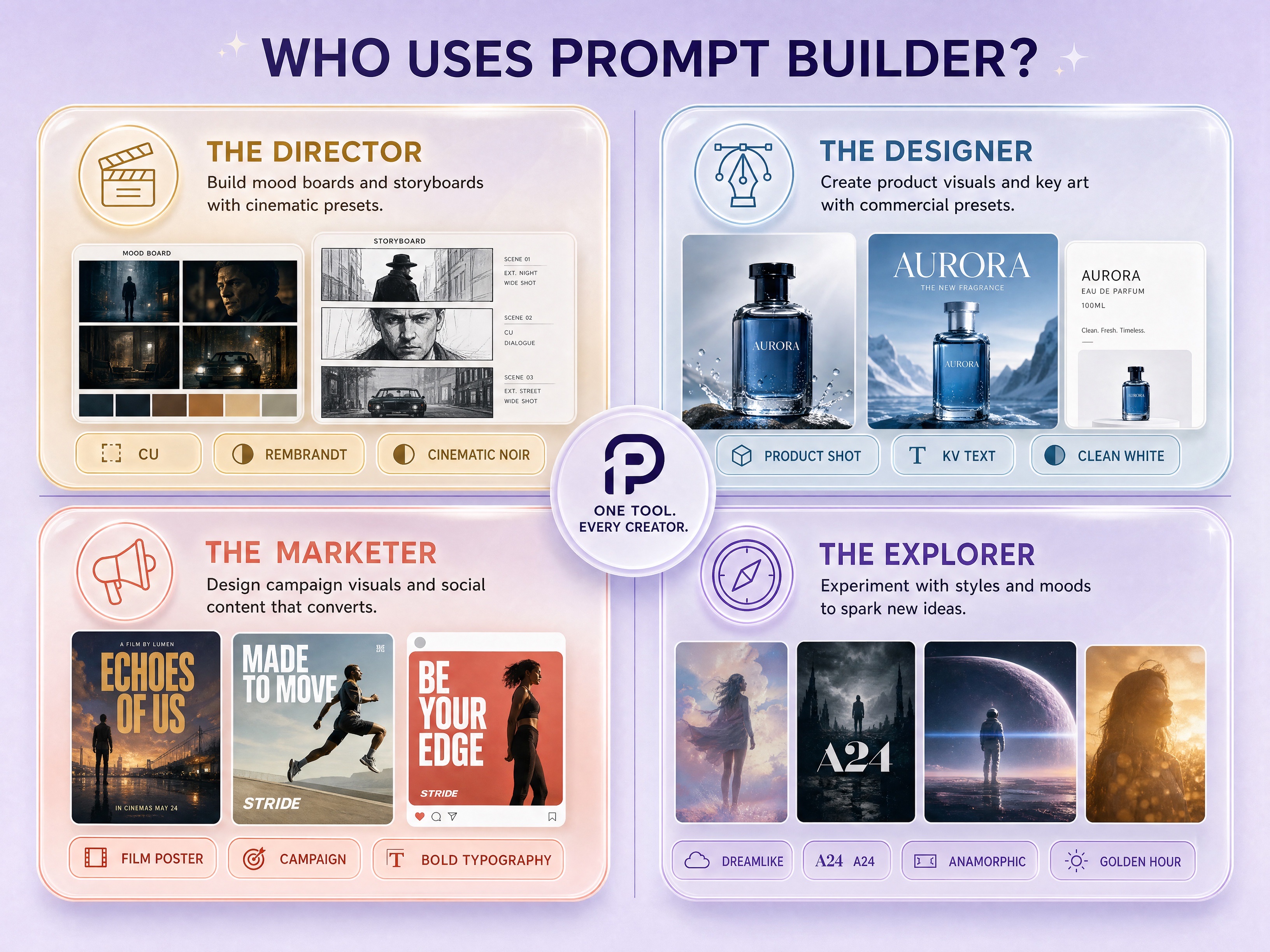
          <SectionLabel
            kicker="Who it serves"
            title="Built for people who think visually"
            sub="Directors, designers, marketers, and explorers do not need the same blank text box. They need a way to express visual intent quickly and consistently."
            align="left"
            accent={accent}
          />
          <div style={{
            display: 'grid', gap: 10, marginTop: -20,
            fontFamily: 'var(--mono)', fontSize: 11, letterSpacing: '0.08em',
            textTransform: 'uppercase', color: 'var(--muted)',
          }}>
            {['Director: mood boards and storyboards', 'Designer: product visuals and key art', 'Marketer: campaign images and social content', 'Explorer: styles, moods, and references'].map((line) => (
              <div key={line} style={{
                display: 'flex', gap: 10, alignItems: 'center',
                padding: '10px 12px', borderRadius: 8,
                background: 'rgba(255,255,255,0.46)', border: '1px solid var(--border)',
              }}>
                <span style={{ width: 7, height: 7, borderRadius: '50%', background: accent }} />
                <span>{line}</span>
              </div>
            ))}
          </div>
        </div>
        <div style={{
          borderRadius: 14, overflow: 'hidden', border: '1px solid var(--border)',
          background: 'rgba(255,255,255,0.45)',
          boxShadow: '0 18px 50px -26px rgba(74,52,108,0.38)',
        }}>
          <img
            src="release-package/PICS/audience-who-uses-prompt-builder.jpg"
            alt="Audience map for Prompt Builder: director, designer, marketer, explorer"
            style={{ width: '100%', display: 'block' }}
          />
        </div>
      </div>
      <style>{`
        @media (max-width: 860px) {
          .audience-proof-grid { grid-template-columns: 1fr !important; }
        }
      `}</style>
    </section>
  );
}

// ─────────────────────────────────────────────────────────────
// Categories — mirrors "What are you making?" screen
// ─────────────────────────────────────────────────────────────
function CategoriesSection({ accent }) {
  return (
    <section id="categories" style={{ padding: '120px 32px 80px', maxWidth: 1280, margin: '0 auto' }}>
      <SectionLabel
        kicker="Pick your goal"
        title="A preset for everything you want to make"
        sub="Mood boards, style frames, character sheets, storyboards, key art — every category is pre-loaded with options. Just select and copy."
        accent={accent}
      />
      <div style={{
        display: 'grid',
        gridTemplateColumns: 'repeat(auto-fit, minmax(220px, 1fr))',
        gap: 36, alignItems: 'start',
      }} className="cats-grid">
        {PRODUCT_CATEGORIES.map((group) => (
          <div key={group.group} style={{ display: 'flex', flexDirection: 'column', gap: 12 }}>
            <div style={{
              fontFamily: 'var(--mono)', fontSize: 10, letterSpacing: '0.16em',
              color: 'var(--dim)', textTransform: 'uppercase', fontWeight: 500,
              paddingBottom: 12, borderBottom: '1px solid var(--border)',
            }}>{group.group}</div>
            {group.items.map((it) => (
              <CategoryCard key={it.name} item={it} accent={accent} />
            ))}
          </div>
        ))}
      </div>
    </section>
  );
}

function CategoryCard({ item, accent }) {
  const [hover, setHover] = React.useState(false);
  return (
    <div
      onMouseEnter={() => setHover(true)}
      onMouseLeave={() => setHover(false)}
      style={{
        background: hover ? 'rgba(255,255,255,0.72)' : 'rgba(255,255,255,0.42)',
        backdropFilter: 'blur(12px)', WebkitBackdropFilter: 'blur(12px)',
        border: `1px solid ${hover ? 'var(--border-2)' : 'var(--border)'}`,
        borderRadius: 12, padding: '14px 14px 14px 16px',
        transition: 'all .2s ease',
        transform: hover ? 'translateY(-2px)' : 'none',
        position: 'relative', cursor: 'pointer',
      }}>
      <div style={{
        display: 'flex', alignItems: 'flex-start', justifyContent: 'space-between', gap: 10,
        marginBottom: 4,
      }}>
        <span style={{
          fontFamily: 'var(--serif)', fontSize: 22, lineHeight: 1, color: accent,
          opacity: 0.85, fontWeight: 300,
        }}>{item.glyph}</span>
        <span style={{
          fontFamily: 'var(--mono)', fontSize: 9.5, letterSpacing: '0.06em',
          color: 'var(--dim)', textTransform: 'uppercase',
          padding: '2px 6px', borderRadius: 4,
          background: item.llm ? 'rgba(90,138,154,0.10)' : 'rgba(0,0,0,0.04)',
          color: item.llm ? 'var(--accent-2)' : 'var(--dim)',
        }}>{item.llm ? 'LLM' : `${item.presets} preset${item.presets === 1 ? '' : 's'}`}</span>
      </div>
      <div style={{ fontSize: 14.5, fontWeight: 500, color: 'var(--text-2)', marginBottom: 4 }}>
        {item.name}
      </div>
      <div style={{ fontSize: 12.5, color: 'var(--muted)', lineHeight: 1.45 }}>
        {item.desc}
      </div>
    </div>
  );
}

// ─────────────────────────────────────────────────────────────
// Anatomy of a prompt
// ─────────────────────────────────────────────────────────────
function AnatomySection({ accent }) {
  return (
    <section id="anatomy" style={{
      padding: '80px 32px', maxWidth: 1180, margin: '0 auto',
    }}>
      <SectionLabel
        kicker="How it works"
        title={<>Every click becomes a <em style={{ fontStyle: 'normal', color: accent, fontWeight: 500 }}>prompt token</em></>}
        sub="Pick what looks right. The tool assembles the syntax — you never need to memorize a single parameter."
        accent={accent}
      />
      <div style={{
        display: 'grid', gridTemplateColumns: '1fr 1.05fr', gap: 32,
        alignItems: 'stretch',
      }} className="anatomy-grid">
        {/* Left — annotated image */}
        <AnatomyShot accent={accent} />
        {/* Right — assembled prompt */}
        <AnatomyPrompt accent={accent} />
      </div>
    </section>
  );
}

function AnatomyShot({ accent }) {
  // Stylized "film still" placeholder — gradient + grain + framing marks
  return (
    <div style={{
      position: 'relative', borderRadius: 14, overflow: 'hidden',
      border: '1px solid var(--border-2)',
      aspectRatio: '2.39 / 1.4',
      background: `
        radial-gradient(ellipse at 35% 55%, rgba(184,154,90,0.32) 0%, transparent 45%),
        radial-gradient(ellipse at 70% 30%, rgba(138,106,170,0.22) 0%, transparent 50%),
        linear-gradient(160deg, #2a2438 0%, #3d3450 45%, #5a4a6a 100%)
      `,
      boxShadow: '0 20px 50px -20px rgba(74,52,108,0.4)',
    }}>
      {/* Film grain */}
      <div style={{
        position: 'absolute', inset: 0, opacity: 0.18, mixBlendMode: 'overlay',
        backgroundImage: 'url("data:image/svg+xml,%3Csvg viewBox=\'0 0 200 200\' xmlns=\'http://www.w3.org/2000/svg\'%3E%3Cfilter id=\'n\'%3E%3CfeTurbulence type=\'fractalNoise\' baseFrequency=\'0.9\' numOctaves=\'2\'/%3E%3C/filter%3E%3Crect width=\'100%25\' height=\'100%25\' filter=\'url(%23n)\'/%3E%3C/svg%3E")',
      }}/>

      {/* Framing marks (anamorphic crop) */}
      <div style={{ position: 'absolute', top: '12%', left: '4%', width: 18, height: 18, borderTop: '1.5px solid rgba(255,255,255,0.6)', borderLeft: '1.5px solid rgba(255,255,255,0.6)' }}/>
      <div style={{ position: 'absolute', top: '12%', right: '4%', width: 18, height: 18, borderTop: '1.5px solid rgba(255,255,255,0.6)', borderRight: '1.5px solid rgba(255,255,255,0.6)' }}/>
      <div style={{ position: 'absolute', bottom: '12%', left: '4%', width: 18, height: 18, borderBottom: '1.5px solid rgba(255,255,255,0.6)', borderLeft: '1.5px solid rgba(255,255,255,0.6)' }}/>
      <div style={{ position: 'absolute', bottom: '12%', right: '4%', width: 18, height: 18, borderBottom: '1.5px solid rgba(255,255,255,0.6)', borderRight: '1.5px solid rgba(255,255,255,0.6)' }}/>

      {/* Subject silhouette suggestion */}
      <div style={{
        position: 'absolute', left: '32%', top: '36%', width: '24%', height: '50%',
        background: 'radial-gradient(ellipse at 50% 20%, rgba(0,0,0,0.55) 0%, rgba(0,0,0,0.2) 50%, transparent 80%)',
        filter: 'blur(2px)',
      }}/>
      <div style={{
        position: 'absolute', left: '36%', top: '34%', width: '14%', height: '20%',
        background: 'radial-gradient(ellipse at 60% 50%, rgba(245,225,190,0.65) 0%, rgba(245,225,190,0.1) 60%, transparent 80%)',
        filter: 'blur(6px)',
      }}/>

      {/* Annotation badges */}
      <Annot top="14%" left="32%" label="WS" sub="Epic wide shot" accent={accent} />
      <Annot top="38%" left="64%" label="35mm" sub="Anamorphic" accent={accent} />
      <Annot top="62%" left="22%" label="Blue hour" sub="Amber industrial glow" accent={accent} />
      <Annot bottom="14%" right="6%" label="Scale" sub="Man small in frame" accent={accent} />

      {/* Bottom strip */}
      <div style={{
        position: 'absolute', bottom: 0, left: 0, right: 0,
        padding: '10px 14px', display: 'flex', justifyContent: 'space-between',
        fontFamily: 'var(--mono)', fontSize: 10, color: 'rgba(255,255,255,0.55)',
        letterSpacing: '0.1em', textTransform: 'uppercase',
        background: 'linear-gradient(transparent, rgba(0,0,0,0.4))',
      }}>
        <span>SCENE 14B · T2</span>
        <span>STYLE REF · VILLENEUVE / RIDLEY SCOTT / NOLAN</span>
      </div>
    </div>
  );
}

function Annot({ top, left, bottom, right, label, sub, accent }) {
  return (
    <div style={{
      position: 'absolute', top, left, bottom, right, transform: 'translate(-50%, -50%)',
      display: 'flex', alignItems: 'center', gap: 6,
    }}>
      <span style={{
        width: 9, height: 9, borderRadius: '50%',
        background: accent, boxShadow: `0 0 0 4px rgba(138,106,170,0.25)`,
      }}/>
      <div style={{
        background: 'rgba(255,255,255,0.92)', backdropFilter: 'blur(8px)',
        borderRadius: 6, padding: '4px 8px', whiteSpace: 'nowrap',
        boxShadow: '0 4px 12px rgba(0,0,0,0.25)',
      }}>
        <div style={{ fontSize: 11, fontWeight: 600, color: 'var(--text)', letterSpacing: '-0.01em' }}>{label}</div>
        <div style={{ fontSize: 9.5, color: 'var(--muted)', fontFamily: 'var(--mono)' }}>{sub}</div>
      </div>
    </div>
  );
}

function AnatomyPrompt({ accent }) {
  return (
    <div style={{
      background: 'rgba(255,255,255,0.55)', backdropFilter: 'blur(12px)',
      border: '1px solid var(--border-2)', borderRadius: 14,
      padding: '24px 26px', display: 'flex', flexDirection: 'column',
    }}>
      <div style={{
        fontFamily: 'var(--mono)', fontSize: 10, letterSpacing: '0.14em',
        color: 'var(--dim)', textTransform: 'uppercase', marginBottom: 16,
      }}>
        Token-by-token breakdown
      </div>

      <div style={{ display: 'flex', flexDirection: 'column', gap: 11, marginBottom: 22 }}>
        {ANATOMY_TOKENS.map((tk, i) => (
          <div key={tk.k} style={{
            display: 'grid', gridTemplateColumns: '88px 1fr', gap: 12,
            alignItems: 'baseline', paddingBottom: 8,
            borderBottom: i < ANATOMY_TOKENS.length - 1 ? '1px dashed rgba(106,90,138,0.14)' : 'none',
          }}>
            <span style={{
              fontFamily: 'var(--mono)', fontSize: 10.5, letterSpacing: '0.08em',
              color: accent, textTransform: 'uppercase', fontWeight: 500,
            }}>{tk.k}</span>
            <span style={{
              fontSize: 14, color: 'var(--text-2)', lineHeight: 1.5,
              fontFamily: tk.k === 'Params' ? 'var(--mono)' : 'var(--sans)',
            }}>{tk.v}</span>
          </div>
        ))}
      </div>

      <div style={{
        marginTop: 'auto',
        background: '#1f1a2a', borderRadius: 10, padding: '14px 16px',
        fontFamily: 'var(--mono)', fontSize: 12, lineHeight: 1.7, color: '#d4c8e8',
        position: 'relative', overflow: 'hidden',
      }}>
        <div style={{
          position: 'absolute', top: 10, right: 12,
          fontSize: 9, letterSpacing: '0.14em', color: 'rgba(255,255,255,0.35)',
          textTransform: 'uppercase',
        }}>/imagine</div>
        <span style={{ color: '#9988aa' }}>/imagine prompt:</span>{' '}
        <span>monumental brutalist steampunk cityscape, modern man alone on a windswept hill, concrete megastructures, brass pipes, industrial haze,</span>{' '}
        <span style={{ color: '#e8c890' }}>epic wide shot</span>,{' '}
        <span style={{ color: '#e8c890' }}>35mm anamorphic</span>,{' '}
        <span style={{ color: '#e8c890' }}>low-angle dusk light</span>,{' '}
        <span style={{ color: '#c4a8e0' }}>awe-struck and foreboding</span>,{' '}
        <span style={{ color: '#a8c8d4' }}>Villeneuve grandeur, Ridley Scott industrial worldbuilding, Nolan scale</span>{' '}
        <span style={{ color: '#7a6a9a' }}>volumetric smoke, realistic film grain</span>
      </div>
    </div>
  );
}

// ─────────────────────────────────────────────────────────────
// Models — each card uses its own syntax as decoration
// ─────────────────────────────────────────────────────────────
function ModelsSection({ accent }) {
  return (
    <section id="models" style={{
      padding: '80px 32px 60px', maxWidth: 1280, margin: '0 auto',
    }}>
      <SectionLabel
        kicker="Output formats"
        title="One tool. Four AI models."
        sub="Each model speaks its own syntax. We handle the translation — you just pick the right model and copy."
        accent={accent}
      />
      <div style={{
        display: 'grid', gridTemplateColumns: 'repeat(auto-fit, minmax(420px, 1fr))',
        gap: 18,
      }} className="models-grid">
        {MODELS.map((m) => <ModelCard key={m.name} model={m} accent={accent} />)}
      </div>
    </section>
  );
}

function tokenizeForLang(text, lang) {
  // Returns array of {t, c} where c is a class hint.
  if (lang === 'mj') {
    // Color flags / commands / values
    return text.split('\n').map((line, li) => (
      <div key={li}>
        {line.split(/(\s+|--?\w[\w:-]*|\/\w+)/g).filter(Boolean).map((tok, ti) => {
          let color = 'inherit';
          if (/^\/\w+/.test(tok)) color = '#a880c8';
          else if (/^--/.test(tok)) color = '#b89a5a';
          else if (/^\d+(\.\d+)?:?\d*$/.test(tok)) color = '#c89860';
          return <span key={ti} style={{ color }}>{tok}</span>;
        })}
      </div>
    ));
  }
  if (lang === 'json') {
    return text.split('\n').map((line, li) => {
      const parts = line.split(/("[^"]*"|\{|\}|\[|\]|:|,)/g).filter((s) => s !== '');
      return (
        <div key={li}>
          {parts.map((p, pi) => {
            let color = '#3d3450';
            if (/^".*"$/.test(p)) color = li === 0 ? '#3d3450' : '#7a8f6a';
            if (/^[{}\[\]:,]$/.test(p)) color = '#9988aa';
            // Keys
            const isKey = parts[pi + 1] === ':';
            if (isKey && /^".*"$/.test(p)) color = '#8a6aaa';
            return <span key={pi} style={{ color }}>{p}</span>;
          })}
        </div>
      );
    });
  }
  // prose / chat — just keep neutral
  return text.split('\n').map((line, li) => <div key={li}>{line}</div>);
}

function ModelCard({ model, accent }) {
  const [hover, setHover] = React.useState(false);
  const bgGlyph = {
    mj: '/imagine',
    prose: '⟨ prose ⟩',
    chat: '💬',
    json: '{ }',
  }[model.lang];
  return (
    <div
      onMouseEnter={() => setHover(true)}
      onMouseLeave={() => setHover(false)}
      style={{
        position: 'relative',
        background: 'rgba(255,255,255,0.48)', backdropFilter: 'blur(14px)',
        border: `1px solid ${hover ? 'var(--border-2)' : 'var(--border)'}`,
        borderRadius: 14, padding: '22px 24px 0',
        overflow: 'hidden', transition: 'all .25s ease',
        transform: hover ? 'translateY(-3px)' : 'none',
        boxShadow: hover ? '0 16px 40px -16px rgba(74,52,108,0.22)' : 'none',
      }}>
      {/* watermark */}
      <div aria-hidden style={{
        position: 'absolute', right: -16, top: -28,
        fontFamily: 'var(--mono)', fontSize: 96, fontWeight: 300,
        color: 'rgba(138,106,170,0.06)', letterSpacing: '-0.04em',
        pointerEvents: 'none', userSelect: 'none', whiteSpace: 'nowrap',
      }}>{bgGlyph}</div>

      <div style={{ display: 'flex', alignItems: 'baseline', justifyContent: 'space-between', position: 'relative' }}>
        <div>
          <div style={{ fontSize: 22, fontWeight: 500, letterSpacing: '-0.01em', color: 'var(--text)' }}>{model.name}</div>
          <div style={{
            fontFamily: 'var(--mono)', fontSize: 10, letterSpacing: '0.12em',
            color: 'var(--muted)', textTransform: 'uppercase', marginTop: 2,
          }}>{model.tag}</div>
        </div>
        <span style={{
          fontFamily: 'var(--mono)', fontSize: 10, letterSpacing: '0.1em',
          padding: '4px 10px', borderRadius: 999,
          background: 'var(--accent-soft)', color: accent, fontWeight: 500,
        }}>READY</span>
      </div>

      <p style={{
        fontSize: 13.5, color: 'var(--muted)', lineHeight: 1.55,
        marginTop: 12, marginBottom: 18, position: 'relative',
      }}>{model.desc}</p>

      <div style={{
        background: 'rgba(31,26,42,0.04)', borderTop: '1px solid var(--border)',
        margin: '0 -24px', padding: '14px 24px 18px',
        fontFamily: 'var(--mono)', fontSize: 11.5, lineHeight: 1.65,
        color: 'var(--text-2)', overflow: 'hidden',
        whiteSpace: model.lang === 'json' ? 'pre' : 'pre-wrap',
        wordBreak: model.lang === 'json' ? 'normal' : 'break-word',
      }}>
        {tokenizeForLang(model.snippet, model.lang)}
      </div>
    </div>
  );
}

// ─────────────────────────────────────────────────────────────
// Author strip
// ─────────────────────────────────────────────────────────────
function AuthorStrip({ accent }) {
  return (
    <section style={{
      padding: '80px 32px', maxWidth: 980, margin: '0 auto',
    }}>
      <div style={{
        background: 'rgba(255,255,255,0.55)', backdropFilter: 'blur(14px)',
        border: '1px solid var(--border)', borderRadius: 16,
        padding: '34px 40px', display: 'grid',
        gridTemplateColumns: '88px 1fr auto', gap: 28, alignItems: 'center',
      }} className="author-strip">
        <div style={{
          width: 88, height: 88, borderRadius: '50%',
          background: 'linear-gradient(135deg, #2a2438 0%, #5a4a6a 50%, #8a6aaa 100%)',
          display: 'grid', placeItems: 'center',
          fontFamily: 'var(--serif)', fontSize: 32, color: '#f5ecd8', fontWeight: 300,
          border: '2px solid rgba(255,255,255,0.7)',
          boxShadow: '0 6px 20px rgba(74,52,108,0.25)',
        }}>EZ</div>
        <div>
          <div style={{
            fontFamily: 'var(--mono)', fontSize: 10.5, letterSpacing: '0.18em',
            color: accent, textTransform: 'uppercase', fontWeight: 500, marginBottom: 8,
          }}>Why the presets actually work</div>
          <h3 style={{
            fontSize: 22, fontWeight: 400, letterSpacing: '-0.015em',
            color: 'var(--text)', lineHeight: 1.35, marginBottom: 6,
          }}>
            Eric Zheng — <span style={{ color: 'var(--muted)' }}>Filmmaker & AI tool builder.</span>
          </h3>
          <p style={{ fontSize: 14, color: 'var(--muted)', lineHeight: 1.55, maxWidth: 540 }}>
            Built this because I got tired of writing prompts from scratch every time.
            The presets collect real film vocabulary — shot sizes, lighting setups, lens choices —
            so you can skip the trial-and-error and just pick what you need.
          </p>
        </div>
        <a href="prompt-builder.html" style={{
          padding: '10px 20px', borderRadius: 8,
          border: `1px solid ${accent}`, color: accent, fontSize: 13, fontWeight: 500,
          whiteSpace: 'nowrap',
        }}>Try the tool →</a>
      </div>
      <style>{`
        @media (max-width: 720px) {
          .author-strip { grid-template-columns: 64px 1fr !important; gap: 18px !important; padding: 24px !important; }
          .author-strip > a { grid-column: 1 / -1 !important; justify-self: start !important; }
        }
      `}</style>
    </section>
  );
}

// ─────────────────────────────────────────────────────────────
// Final CTA + Footer
// ─────────────────────────────────────────────────────────────
function CtaSection({ accent }) {
  return (
    <section style={{ padding: '60px 32px 100px', textAlign: 'center' }}>
      <div style={{
        maxWidth: 720, margin: '0 auto',
        background: 'rgba(255,255,255,0.5)', backdropFilter: 'blur(18px)',
        border: '1px solid var(--border)', borderRadius: 18,
        padding: '56px 40px 52px', position: 'relative', overflow: 'hidden',
      }}>
        <div aria-hidden style={{
          position: 'absolute', top: -180, left: '50%', transform: 'translateX(-50%)',
          width: 560, height: 360,
          background: 'radial-gradient(ellipse, rgba(138,106,170,0.22), transparent 65%)',
          pointerEvents: 'none',
        }}/>
        <div style={{
          fontFamily: 'var(--mono)', fontSize: 11, letterSpacing: '0.18em',
          color: accent, textTransform: 'uppercase', marginBottom: 18, fontWeight: 500,
          position: 'relative',
        }}>/imagine →</div>
        <h2 style={{
          fontSize: 'clamp(28px, 3.6vw, 40px)', fontWeight: 300,
          letterSpacing: '-0.02em', lineHeight: 1.2, marginBottom: 16,
          position: 'relative',
        }}>
          Stop guessing. Stop Googling prompt syntax.<br/>
          <span style={{ color: accent, fontWeight: 500 }}>Just select what looks right, and copy.</span>
        </h2>
        <p style={{
          fontSize: 16, color: 'var(--muted)', lineHeight: 1.6,
          maxWidth: 480, margin: '0 auto 32px', position: 'relative',
        }}>
          The whole preset library in one HTML file. Works offline, no account, no setup. Add an API key if you want AI to enhance your prompts further — but great results don't need it.
        </p>
        <div style={{ display: 'flex', gap: 12, justifyContent: 'center', flexWrap: 'wrap', position: 'relative' }}>
          <a href="prompt-builder.html" style={{
            padding: '14px 30px', borderRadius: 10, background: accent, color: '#fff',
            fontWeight: 500, fontSize: 15, display: 'inline-flex', alignItems: 'center', gap: 10,
            boxShadow: '0 8px 28px rgba(138,106,170,0.34)',
          }}>
            Open Prompt Builder
            <span style={{ fontFamily: 'var(--mono)', opacity: 0.8 }}>→</span>
          </a>
          <span style={{
            padding: '14px 24px', borderRadius: 10,
            background: 'rgba(255,255,255,0.6)', color: 'var(--text-2)',
            border: '1px solid var(--border-2)', fontWeight: 500, fontSize: 15,
          }}>Source link later</span>
        </div>
      </div>
    </section>
  );
}

function Footer() {
  return (
    <footer style={{
      padding: '32px 32px 48px', textAlign: 'center',
      fontFamily: 'var(--mono)', fontSize: 11, letterSpacing: '0.06em',
      color: 'var(--dim)', borderTop: '1px solid var(--border)',
      maxWidth: 1180, margin: '0 auto',
    }}>
      <div style={{ display: 'flex', justifyContent: 'space-between', alignItems: 'center', flexWrap: 'wrap', gap: 12 }}>
        <span>PROMPT BUILDER · v1.0</span>
        <span style={{ color: 'var(--muted)' }}>Static HTML · no account · no tracking</span>
        <span>© 2026 ERIC ZHENG</span>
      </div>
    </footer>
  );
}

Object.assign(window, {
  SectionLabel, CategoriesSection, AnatomySection, ModelsSection,
  AuthorStrip, CtaSection, Footer, ShowcaseSection, AudienceProofSection,
});


// ─────────────────────────────────────────────────────────

// Main app — orchestrates sections + wires Tweaks.

const TWEAK_DEFAULTS = /*EDITMODE-BEGIN*/{
  "accent": "#8a6aaa",
  "rotateRole": true,
  "showAuthor": true,
  "showAnatomy": true,
  "background": "lavender"
}/*EDITMODE-END*/;

const BACKGROUNDS = {
  lavender: 'linear-gradient(160deg,#f0e6f6 0%,#e6eef6 40%,#e6f6f0 100%)',
  warm:     'linear-gradient(160deg,#f5ede0 0%,#f0e6f0 50%,#e8e0ed 100%)',
  cool:     'linear-gradient(160deg,#e6eef6 0%,#e6f2f5 50%,#edeaf5 100%)',
  mist:     'linear-gradient(160deg,#f4f1f7 0%,#eef0f5 50%,#ecf2f0 100%)',
};

const ACCENTS = ['#8a6aaa', '#6a5a9a', '#9a6a8a', '#5a8a9a', '#b89a5a'];

function App() {
  const [t, setTweak] = useTweaks(TWEAK_DEFAULTS);

  // Sync background to CSS var
  React.useEffect(() => {
    document.body.style.backgroundImage = BACKGROUNDS[t.background] || BACKGROUNDS.lavender;
    document.documentElement.style.setProperty('--accent', t.accent);
    document.documentElement.style.setProperty('--accent-soft',
      hexToRgba(t.accent, 0.10));
  }, [t.accent, t.background]);

  return (
    <div>
      <Hero accent={t.accent} rotateRole={t.rotateRole} />
      <ShowcaseSection accent={t.accent} />
      <CategoriesSection accent={t.accent} />
      <AudienceProofSection accent={t.accent} />
      {t.showAnatomy && <AnatomySection accent={t.accent} />}
      <ModelsSection accent={t.accent} />
      {t.showAuthor && <AuthorStrip accent={t.accent} />}
      <CtaSection accent={t.accent} />
      <Footer />

      <TweaksPanel>
        <TweakSection label="Theme" />
        <TweakColor label="Accent" value={t.accent} options={ACCENTS}
          onChange={(v) => setTweak('accent', v)} />
        <TweakSelect label="Background" value={t.background}
          options={['lavender', 'warm', 'cool', 'mist']}
          onChange={(v) => setTweak('background', v)} />

        <TweakSection label="Hero" />
        <TweakToggle label="Rotate role word" value={t.rotateRole}
          onChange={(v) => setTweak('rotateRole', v)} />

        <TweakSection label="Sections" />
        <TweakToggle label="Show Anatomy" value={t.showAnatomy}
          onChange={(v) => setTweak('showAnatomy', v)} />
        <TweakToggle label="Show Author strip" value={t.showAuthor}
          onChange={(v) => setTweak('showAuthor', v)} />
      </TweaksPanel>
    </div>
  );
}

function hexToRgba(hex, a) {
  const m = hex.replace('#', '');
  const r = parseInt(m.slice(0,2), 16);
  const g = parseInt(m.slice(2,4), 16);
  const b = parseInt(m.slice(4,6), 16);
  return `rgba(${r},${g},${b},${a})`;
}

ReactDOM.createRoot(document.getElementById('root')).render(<App />);